
From Office to Field: Keeping AEC Project Data Connected with Global Mapper and Avenza Maps
October 26, 2026A survey team delivers site data. Engineers use it to develop a design. Field crews take project maps onto the job site. At closeout, the owner receives information intended to support the asset for years to come.
At every handoff, the next team needs to understand where the data belongs, what it represents, and whether it is suitable for the work ahead. A coordinate mismatch, an outdated map, or an observation without a clear feature reference can interrupt that continuity.
AEC teams often work across GIS, CAD, and building information modeling (BIM) environments. Maintaining geospatial continuity means ensuring that survey data, terrain, project maps, and field observations retain the location references and context needed to support those workflows.
Geospatial continuity means keeping spatial data correctly referenced, traceable, and usable as an architecture, engineering, and construction project moves from planning through operations. Maintaining it requires a shared spatial reference, deliberate data exchanges, and a way to bring field findings back into the project.
Global Mapper supports data preparation, analysis, and exchange in the office. Avenza Maps extends project maps into the field with offline access and location-based observations. Together, they can support the handoffs that keep spatial context useful throughout an AEC project.
Start with a documented spatial foundation
Before combining project datasets, establish how locations and elevations will be referenced. Record the project coordinate reference system, horizontal datum, vertical reference, and units. Include the source, collection date, and known accuracy of each input. Document the survey control points, benchmarks, and other reliable reference data used to validate the alignment of project layers.
For example, a terrain dataset and a design drawing may use different coordinate systems or elevation references. Bringing them into the same view is a starting point. The project team still needs to confirm that their positions and elevations are appropriate for comparison.
Global Mapper can bring together survey inputs, control data, imagery, terrain, and point clouds for project preparation. Its coordinate capabilities help teams work with differently referenced datasets, subject to the available transformations and project requirements.
For a road project, a proposed drainage connection and an existing structure might appear to intersect in the model while their actual ground locations are several feet apart. Discovering that discrepancy during construction can lead to additional survey work, design changes, and costly delays and rework. Validating project layers against reliable site control helps teams identify alignment problems before they affect field execution.
Preserve useful information as data moves into design
Design handoffs should include the information the receiving team needs to use the data correctly. Agree on the required geometry, elevations, attributes, units, and file formats before export. Keep the source files and a record of any processing or conversion.
Global Mapper supports import and export of formats including DWG and DXF, giving teams options for exchanging spatial data with CAD workflows. Support for a format does not establish that every application-specific object, attribute, or styling choice will survive an exchange unchanged. Test the actual output in the receiving application.
A practical acceptance check is to confirm that the exported data opens in the intended location, contains the expected features, and preserves the values required for the next task. If a handoff needs contours and feature IDs, verify both rather than relying on the appearance of the map alone.
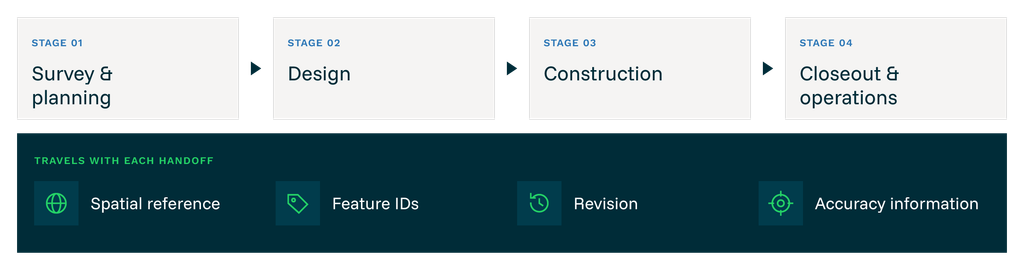
Beneath the stages, show the information that should travel with each handoff: spatial reference, feature IDs, revision, and accuracy information.
Identify Global Mapper with office preparation and data exchange. Identify Avenza Maps with field map use and observations. Add a return arrow from field observations to office review labeled “Export, import, and review.”
Give field crews an approved project map they can use offline
Once work moves on site, continuity depends on crews being able to access the project information prepared in the office. Before deployment, choose the layers and map extent needed for the task. Include readable labels, a legend, and a visible revision date.
Global Mapper can export geospatial PDFs with embedded positioning information. Avenza Maps supports importing project maps such as geospatial PDFs and GeoTIFFs for offline use, allowing crews to view their location on a downloaded map using their device’s GPS.
For a road improvement project, that map might show the work corridor, access routes, and areas flagged for a site walk. A crew can use the map to orient itself and record observations without relying on continuous cellular coverage.
Make map revision management part of the deployment process. Name an owner for issuing updates, tell crews which revision is approved, and retire superseded copies. An offline map remains the version that was downloaded until the team distributes and loads an update.
Set accuracy expectations for each field task. Device GPS can support orientation and observations, but any use for staking, precision measurements, or formal as-built records must meet the project’s equipment, control, and verification requirements.
Shared project context. Location-specific field observations.
Take the project map into the field
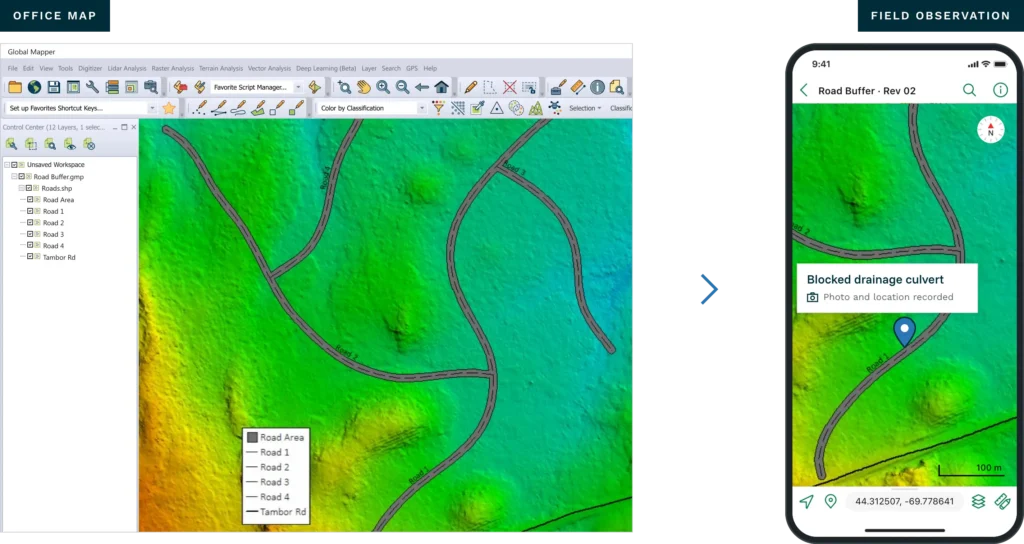
Annotate three items: map revision, feature ID, and observation details. Show notes, attributes, or photos only after the product SMEs confirm their behavior in the illustrated workflow.
Return field observations with enough context for review
Field findings become more useful when the office can connect them to a location, a feature, and a project revision. Decide what crews should record before they leave the office. Use consistent feature identifiers and a small set of required fields, such as observation type, date, and review status.
Global Mapper’s Feature Templates help standardize feature creation with predefined attributes, allowed values, editing restrictions, and required entries. In Avenza Maps, attribute schemas provide consistent fields, data types, and optional picklists to guide field collection. For example, a drainage observation schema could include a related feature ID, observation date, and a condition picklist with values such as blocked, damaged, or inaccessible.
Configure the collection structure in each application rather than assuming that Global Mapper’s template rules will transfer to Avenza Maps. Test the exchange to confirm that the field names and collected values needed for office review are preserved.
Avenza Maps supports collecting map features with notes, custom attribute values, and photos. Features can be exported for use in other software; available formats and capabilities depend on the plan and export options.
In the road project example, a crew might mark a blocked access point or document an unexpected drainage condition. Those observations can be exported and brought into the office workflow for review against the relevant project data. Choose an exchange format supported by both applications and test which geometry, attributes, and photo references it preserves.
Keep incoming observations separate from approved project changes until someone reviews them. The reviewer should check location quality, supporting evidence, and the affected feature before deciding whether the project dataset needs an update. This creates a clear distinction between what was observed and what was accepted.
Prepare closeout data for the next phase of the asset
At handover, spatial information should remain understandable to people who were not involved in its creation. Agree on the owner’s required formats and attributes early, then check the final deliverables against those requirements.
Include coordinate and elevation reference information, units, stable feature IDs, source dates, and a record of approved revisions. Keep supporting observations accessible where they help explain a change, while clearly identifying which records have been verified.
Global Mapper can help prepare spatial outputs in supported formats for the receiving team. Avenza Maps observations can contribute field context to the review process. Neither step removes the need to validate formal as-built information or confirm compatibility with the owner’s asset systems.

A practical checklist for every geospatial handoff
- Confirm coordinate and elevation references and units.
- Identify the approved revision, source date, and data owner.
- Verify that required geometry, attributes, and feature IDs survive the exchange.
- Open the deliverable in the receiving application and check its location and usability.
- Record accuracy limits, processing decisions, and unresolved questions.
- Define how field observations will be returned, reviewed, and approved.
Keep spatial context moving with the project
Geospatial continuity comes from making each handoff usable and accountable. Teams need to know what they are receiving, how it was prepared, and what they can rely on it to do.
Global Mapper and Avenza Maps support that process by connecting office data preparation with offline field mapping and the return of location-based observations. With clear reference standards and review practices, each phase can build on the work already completed.
Explore Blue Marble’s AEC workflows to see how Global Mapper and Avenza Maps can support your project from office preparation through field work and delivery.
Frequently asked questions
What is geospatial continuity in AEC?
Geospatial continuity is the practice of keeping spatial data correctly referenced, traceable, and usable as it moves between survey, design, construction, and asset handover.
How do Global Mapper and Avenza Maps work together?
A team can prepare and export a georeferenced project map from Global Mapper, load it into Avenza Maps for offline field use, and export collected observations for office review using compatible formats.
Can Avenza Maps be used without cellular service?
Yes. Once the required maps are downloaded, Avenza Maps supports offline map viewing and GPS positioning using the device’s location capabilities. Download and test the maps before leaving coverage.
Does a geospatial PDF preserve all the underlying project data?
A geospatial PDF provides a map with positioning information. Treat it as a field map deliverable and retain the source datasets separately. Confirm any required layer, attribute, or interaction behavior in the receiving application.
Do these products automatically keep every project revision synchronized?
The workflow described here uses deliberate map distribution and data export and import. Teams still need to establish revision ownership, update procedures, and approval steps.