Searching the Datasource
Global Mapper's Geodetic Datasource contains definitions for all of its built-in coordinate reference systems and transformations. It can be searched when choosing a new coordinate reference system or transformation, or when specifying a new unit. All datasource searches share similar dialogs and are outlined below.
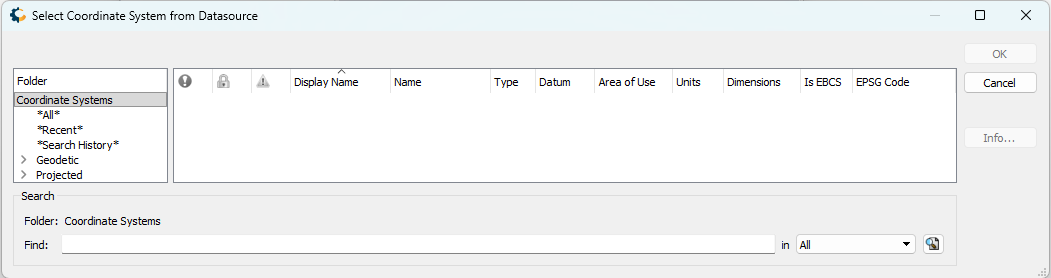
The interface has three sections: directories of relevant objects on the left, a table on the right showing search results or items in the selected folder, and a search bar at the bottom. When using the search bar, only objects within the currently-selected directory will be searched.
Note the following folders that are present for all searches:
- *All*: The entire list of available coordinate systems, transformations, or units.
- *Recent*: Quick access to recently-used coordinate systems, transformations, or units. Right-click to clear this list.
- *Search History*: Past searches are preserved here. Right-click to clear this list.
The table with results can be sorted by any field by clicking in the header. Fields can be hidden by right-clicking in the header. For more information on any entry, use the Info... button or right-click on the entry.
Selecting a Horizontal Coordinate Reference System
Horizontal coordinate systems are sorted based on type and area of use. Note the following folders:
- Geodetic: All geodetic coordinate systems. These were previously accessed using the "Geographic" projection setting in versions of Global Mapper prior to v27.0.
- Projected: All projected coordinate systems.
Within the Geodetic and Projected folders, coordinate systems are organized by area of use.
Selecting a Vertical Coordinate Reference System
Vertical coordinate systems are sorted based on area of use.
Selecting a Unit
When selecting a unit, results will be limited by the current coordinate reference system. Geodetic horizontal coordinate systems use angular units, while projected and vertical coordinate systems use linear units.
Selecting a Transformation
The window to select a transformation has an additional element: a small map indicating the selected transformation's area of use. Additionally, the source and target coordinate systems will be shown at the top of the window for reference.
Coordinate Transformations are sorted based on type. Datasource Transformations are any transformations with definitions in the datasource, while Generated Transformations consist of two transformations performed via an intermediate datum.
 .
.
Geodetic Settings that affect searches
There are several settings that affect which systems or transformations will be shown when searching:
If Show deprecated geodetic definitions is unchecked, then deprecated objects will not be present in the directory or found when searching.
If Filter coordinate transformations by area of use is unchecked, then only transformations with an area of use that includes the data will be shown.
If Enable 'via intermediate' category is unchecked, then generated transformations will not be shown.