Find Flight Lines (Swaths)
The Find Flight Lines (Swaths) tool is used to identify and label flight lines in lidar data. Flight lines are separated based on breaks in the GPS time stamps during data collection. Once identified, flight lines are labeled with a number and added to the lidar data as an attribute.
To visualize the finished flight lines in the workspace, change the Lidar Draw Mode to Color By User Data.
The Find Flight Lines (Swaths) tool is found in the Lidar Analysis menu, or in the Lidar Strip Alignment tool as “Calculate Flight Lines…”.
Related tools:
Strip / Flight Line Alignment - Adjust one lidar strip / flight line to match another through the manual placement of control points.
Create Swath Separation Image - Create a raster used as a quality assessment of vertical alignment of collected lidar swaths.
Lidar Flight Line Finder
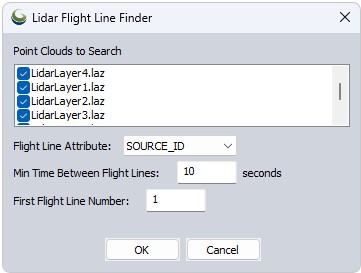
Flight Line Attribute - Choose an attribute to assign the flight line numbers to: SOURCE_ID or USER_DATA.
Min Time between Flight Lines - Set the minimum gap in GPS_TIME required to delineate flight paths. The tool uses breaks in GPS time stamps to separate the different paths.
First Light Line Number - Set the starting number for the flight lines.
To visualize the flight lines, change the Lidar Draw Mode to Color By User Data or Source ID, depending on which attribute you selected for saving the new flight lines.