Display Statistics for Selected Lidar
Statistics for lidar can be generated either for points that have been selected with the digitizer tool, or selected via an area feature. Both Display Statistics for Selected Lidar and Calculate Lidar Stats in Selected Area features function similarly as described here for the respective subsets.
Visualization of some of these statistics can be found in the layer's metadata tab under Histograms.
Calculated lidar attributes can be added to area features by using the Calculate Lidar Statistics in Selected Area Features tool.

|
This tool requires Global Mapper Pro |
After selecting the points, the option to Display Statistics for Selected Lidar is found in the Digitizer Menu, or right-click context menu, under Analysis/Measurement.
There are 2 tabs in the Lidar Dataset Properties window: Statistics , and Additional Statistics.
Statistics tab
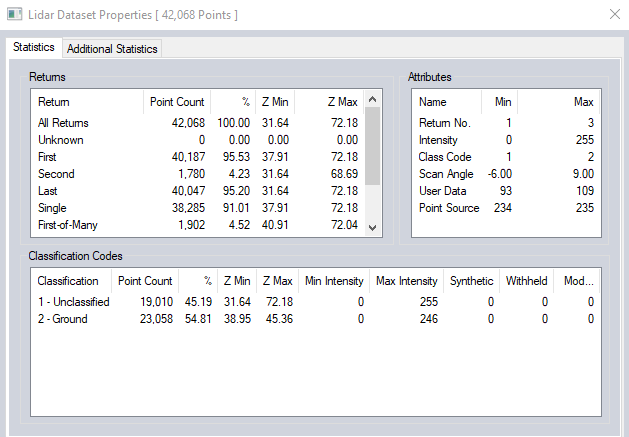
The statistics tab of the dialog displays a summary of the Attributes, Return counts, and Classification Codes.
Additional Statistics tab
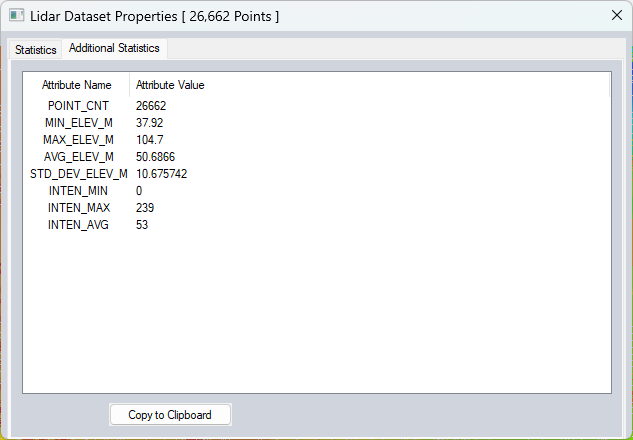
The Additional Statistics tab displays area statistics. When calculated from selected points without an area feature, the bounds of the selected points are used.
If more than 3 points are selected, Global Mapper will also include statistics relative to a best-fit plane:
"PLANE_AVG_DIST_M" - average distance of points from best-fit plane
"PLANE_STD_DEV_DIST_M" - std dev of distance of points from best-fit-plane
"PLANE_MAX_ABOVE_DIST_M" - distance from best-fit plane of furthest point from plane that is above it
"PLANE_MAX_ABOVE_DIST_POS_X” - location of point the max distance above plane
"PLANE_MAX_ABOVE_DIST_POS_Y"
"PLANE_MAX_ABOVE_DIST_POS_Z"
"PLANE_MAX_BELOW_DIST_M" - distance from best-fit plane of furthest point from plane that is below it
"PLANE_MAX_BELOW_DIST_POS_X" - location of point the max distance below plane
"PLANE_MAX_BELOW_DIST_POS_Y"
"PLANE_MAX_BELOW_DIST_POS_Z"
Scripting Reference
CALC_LIDAR_STATS parameter for the EDIT_VECTOR command.